
2025-09-12 @
Visualizing Angular’s dependency injection
Dependency injection (DI) is an incredibly powerful concept that is heavily relied on in the enterprise space, yet, it is often mentioned as a drawback to using Angular in general web development circles. Some people say it is convoluted or straight up overengineering.
Let’s try to make it a bit more clear by visualizing it.
What is DI?
Basically, dependency injection is a design pattern where a class receives its dependencies from an external source instead of creating them itself. An often used example to make it a bit more relatable is that of a cook working in a kitchen. Instead of having to go to the store and buying the ingredients himself, the chef just writes a list of what he needs for the day and it is the job of someone else to get the ingredients. In this example, a component can be the chef and Angular, the framework itself, is the one responsible to get what the component needs.
Using DI has great benefits when it comes to unit testing, so keep that in mind, but it is outside of the scope of this article, so we won’t talk about it further.
Basic example
Before we get into the visualization, let’s cover some theory and take a look at a very simple service definition:
@Injectable({
  providedIn: 'root'
})
export class GlobalService { }
In this case, GlobalService is called “Global” for a very good reason. The @Injectable() decorator specifies that Angular can use this class in the DI system and ensures that the compiler will generate all the metadata the framework needs to create the class’ dependencies when it gets injected. Since we added providedIn: 'root', Angular will make this service available - or in other words, it will provide it - to our entire application. The framework will create an instance of this class the first time we inject it anywhere, and by default, it will share the same instance with anything that requests it.
Injecting a service
The modern approach is to use the inject function like this:
@Component({
  selector: 'app-dummy-component',
  template: ``,
})
export default class DummyComponent {
  globalService = inject(GlobalService);
}
However, in older projects, you might see the old approach too, constructor based injection:
@Component({
  selector: 'app-dummy-component',
  template: ``,
})
export default class DummyComponent {
  constructor(private globalService: GlobalService) { }
}
Why does this matter? Well, it will start to make a lot more sense as your dependency hierarchy grows, but let’s create an example. Let’s say we have the same setup as above, but we we want to avoid DI and we create our dependencies manually. Since GlobalService is just a class in the end of the day, we can use the new keyword:
@Component({
  selector: 'app-dummy-component',
  template: ``,
})
export default class DummyComponent {
  globalService = new GlobalService();
}
It’s not that bad, right? Well, yes, but what if GlobalService has dependencies of its own? With this approach, we need to be aware of all of those and supply them when creating our instance of it.
Let’s say GlobalService looks like this:
export class GlobalService {
  constructor(
    private logger: LoggerService,
    private userStore: UserStore,
    private preferencesStore: PreferencesStore
  ) { }
}
Then, our component has to create all of the dependencies of GlobalService before it can create an instance of GlobalService itself.
@Component({
  selector: 'app-dummy-component',
  template: ``,
})
export default class DummyComponent {
  globalService = new GlobalService(
    new LoggerService(),
    new UserStore(),
    new PreferencesStore()
  );
}
If we take this a step further, what if we have to send our logs to a third party service through the network for analytics purposes, so LoggerService has dependencies of its own? What if a dependency of LoggerService has dependencies too? Obviously, there are methods to prevent things to get out of control, but if we are using DI, then regardless of the complexity of the dependency tree, we just have to do this:
@Component({
  selector: 'app-dummy-component',
  template: ``,
})
export default class DummyComponent {
  globalService = inject(GlobalService);
}
Yes, even if GlobalService has the same dependencies as above.
Providing a service on the component level
So we’ve discussed that by default, using providedIn: 'root' results in a single instance of our service being shared by the entire application. What if we need more finegrained control than that and we need a new instance of it in every component that requests one? That’s what the provicers array in the @Component() decorator is for.
Let’s say, on top of our GlobalService and DummyComponent, we also have a DummyService. This time, we do not provide it on the root level:
@Injectable()
export class GlobalService { }
Then, in DummyComponent, we add it to providers:
@Component({
  selector: 'app-dummy-component',
  providers: [DummyService],
  template: ``,
})
export default class DummyComponent {
  globalService = inject(GlobalService);
  dummyService = inject(DummyService);
}
This will result in DummyComponent sharing a single instance of GlobalService with everything else in our application, but every instance of DummyComponent will receive a new instance of DummyService. If DummyComponent has child components, those children will receive the same instance of DummyService their parent has, unless a child adds the service to its own providers. In the latter case, the child receives an entirely new instance too. If this sounds a bit confusing, don’t worry, it will make a lot more sense in a bit, when we get to visualizing this.
One caveat here, is that you can combine the two approaches. Let’s say we create a new component:
@Component({
  selector: 'app-dummy-component',
  providers: [GlobalService],
  template: ``,
})
export default class VeryDumbComponent {
  globalService = inject(GlobalService);
}
We added GlobalService to the providers of VeryDumbComponent, which results in an entirely new instance of GlobalService being created specifically for an instance of VeryDumbComponent and its children.
Sometimes you may want that, but if that is the case, then you likely should refactor your code. If you start providing services, that are provided on the root level, on the component level too, it might lead to unexpected behavior, if someone takes a look at the service definition and sees that it is supposed to be a globally available instance.
I hope this explanation somewhat cleared up how this all works, but in case it didn’t, let’s visualize it.
Visualization
The setup
We will take a look at several examples, but all of them will be based on these two services:
@Injectable({
  providedIn: 'root'
})
export class GlobalService {
  serviceName = signal('GlobalService - ' + Math.random().toString(36).substring(2, 6));
}

@Injectable()
export class ProductService {
  serviceName = signal('ProductService - ' + Math.random().toString(36).substring(2, 6));
}
Both services will have a serviceName that gets randomly generated when an instance of the service is created. We have this because we will show these names on our screen, so we can easily determine if we see a single instance or multiple instances of the same service on our screen.
GlobalService is provided on the root level, but we will provide ProductService depending on our needs at the given example. I named our service Product and later we will talk about Parent and Details components, but these names don’t really mean anything, giving them a name just makes it easier to talk about them.
The source code of the example app used for this demonstration can be found here.
The live demo application can also be seen here.
Single instance down the tree
First, take a look at our main component for the example:
@Component({
  selector: 'app-product-single-service',
  imports: [ProductSingleServiceDetailsComponent, ProductSingleServiceParentComponent],
  providers: [ProductService],
  template: `
    <main>
      <h1>Product - Single Service</h1>
      <p>{{ globalService.serviceName() }}</p>
      <p>{{ productService.serviceName() }}</p>
      <app-product-single-service-details />
      <app-product-single-service-parent />
    </main>
  `,
  styles: `
    main {
      height: 565px;
      width: 405px;
      border: 5px solid black;
      text-align: center;
    }
  `
})
export default class ProductSingleServiceComponent {
  globalService = inject(GlobalService);
  productService = inject(ProductService);
}
So far, this is fairly straightforward based on the explanation above. At least I hope so. We inject both of our services in our component and show their generated names on our screen. Notice, that we added ProductService to the providers array. However, we have two more components embedded:
@Component({
  selector: 'app-product-single-service-details',
  template: `
    <main>
      <h1>Details</h1>
      <p>{{ globalService.serviceName() }}</p>
      <p>{{ productService.serviceName() }}</p>
    </main>
  `,
  styles: `
    main {
      height: 200px;
      width: 400px;
      border: 5px solid black;
      text-align: center;
    }
  `
})
export class ProductSingleServiceDetailsComponent {
  globalService = inject(GlobalService);
  productService = inject(ProductService);
}

@Component({
  selector: 'app-product-single-service-parent',
  template: `
    <main>
      <h1>Parent</h1>
      <p>{{ globalService.serviceName() }}</p>
      <p>{{ productService.serviceName() }}</p>
    </main>
  `,
  styles: `
    main {
      height: 200px;
      width: 400px;
      border: 5px solid black;
      text-align: center;
    }
  `
})
export class ProductSingleServiceParentComponent {
  globalService = inject(GlobalService);
  productService = inject(ProductService);
}
In case of this specific example, the two components are exactly the same. What should be noted however, is that neither has a providers array of their own. This means, that both of these components will share the ProductService instance with the component that these are embedded in.
If you run the demo, your uniquely generated names should be different, but you should see something like this:
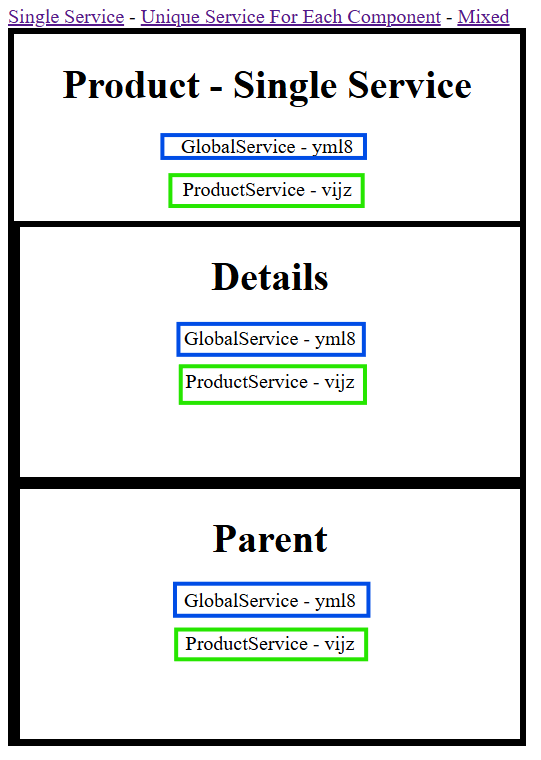
As you can see, all three components share the same instances of both GlobalService and ProductService.
Unique instance for all components
In this example, the embedding component is more or less the same:
@Component({
  selector: 'app-product-unique-service-for-each',
  imports: [ProductUniqueServiceForEachDetailsComponent, ProductUniqueServiceForEachParentComponent],
  providers: [ProductService],
  template: `
    <main>
      <h1>Product - Unique Service</h1>
      <p>{{ globalService.serviceName() }}</p>
      <p>{{ productService.serviceName() }}</p>
      <app-product-unique-service-for-each-details />
      <app-product-unique-service-for-each-parent />
    </main>
  `,
  styles: `
    main {
      height: 565px;
      width: 405px;
      border: 5px solid black;
      text-align: center;
    }
  `
})
export default class ProductUniqueServiceForEachComponent {
  globalService = inject(GlobalService);
  productService = inject(ProductService);
}
The embedded components however, have their own instance of ProductService provided to them:
@Component({
  selector: 'app-product-unique-service-for-each-details',
  providers: [ProductService],
  template: `
    <main>
      <h1>Details</h1>
      <p>{{ globalService.serviceName() }}</p>
      <p>{{ productService.serviceName() }}</p>
    </main>
  `,
  styles: `
    main {
      height: 200px;
      width: 400px;
      border: 5px solid black;
      text-align: center;
    }
  `
})
export class ProductUniqueServiceForEachDetailsComponent {
  globalService = inject(GlobalService);
  productService = inject(ProductService);
}

@Component({
  selector: 'app-product-unique-service-for-each-parent',
  providers: [ProductService],
  template: `
    <main>
      <h1>Parent</h1>
      <p>{{ globalService.serviceName() }}</p>
      <p>{{ productService.serviceName() }}</p>
    </main>
  `,
  styles: `
    main {
      height: 200px;
      width: 400px;
      border: 5px solid black;
      text-align: center;
    }
  `
})
export class ProductUniqueServiceForEachParentComponent {
  globalService = inject(GlobalService);
  productService = inject(ProductService);
}
Our application confirms this is the case, because, while every component shares a single GlobalService instance, all of them has a unique instance of our ProductService:
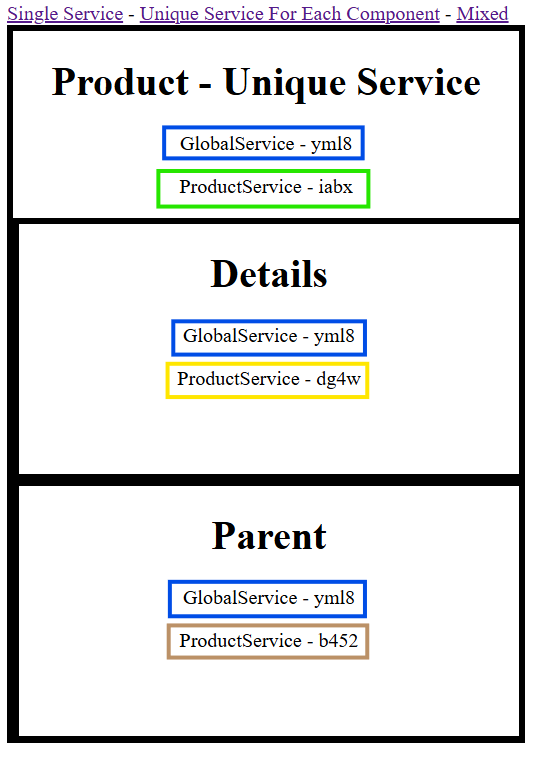
Notice, that the name of the global service is the same as it was in the last example, assuming you didn’t reload the application, confirming, that this instance is truly global.
Let’s mix things up
For our final example, we’ll take a look at mixing things up. Our base component remains the same:
@Component({
  selector: 'app-product-mixed',
  imports: [ProductMixedDetailsComponent, ProductMixedParentComponent],
  providers: [ProductService],
  template: `
    <main>
      <h1>Product - Mixed</h1>
      <p>{{ globalService.serviceName() }}</p>
      <p>{{ productService.serviceName() }}</p>
      <app-product-mixed-details />
      <app-product-mixed-parent />
    </main>
  `,
  styles: `
    main {
      height: 565px;
      width: 405px;
      border: 5px solid black;
      text-align: center;
    }
  `
})
export default class ProductMixedComponent {
  globalService = inject(GlobalService);
  productService = inject(ProductService);
}
ProductMixedDetailsComponent does not have its own providers, so it will share ProductService with the base component and it will receive the GlobalService instance all of our application is using.
@Component({
  selector: 'app-product-mixed-details',
  template: `
    <main>
      <h1>Details</h1>
      <p>{{ globalService.serviceName() }}</p>
      <p>{{ productService.serviceName() }}</p>
    </main>
  `,
  styles: `
    main {
      height: 200px;
      width: 400px;
      border: 5px solid black;
      text-align: center;
    }
  `
})
export class ProductMixedDetailsComponent {
  globalService = inject(GlobalService);
  productService = inject(ProductService);
}
ProductMixedParentComponent however, has both ProductService and GlobalService in its providers:
@Component({
  selector: 'app-product-mixed-parent',
  providers: [ProductService, GlobalService],
  template: `
    <main>
      <h1>Parent</h1>
      <p>{{ globalService.serviceName() }}</p>
      <p>{{ productService.serviceName() }}</p>
    </main>
  `,
  styles: `
    main {
      height: 200px;
      width: 400px;
      border: 5px solid black;
      text-align: center;
    }
  `
})
export class ProductMixedParentComponent {
  globalService = inject(GlobalService);
  productService = inject(ProductService);
}
This results in a mix of our previous approaches:
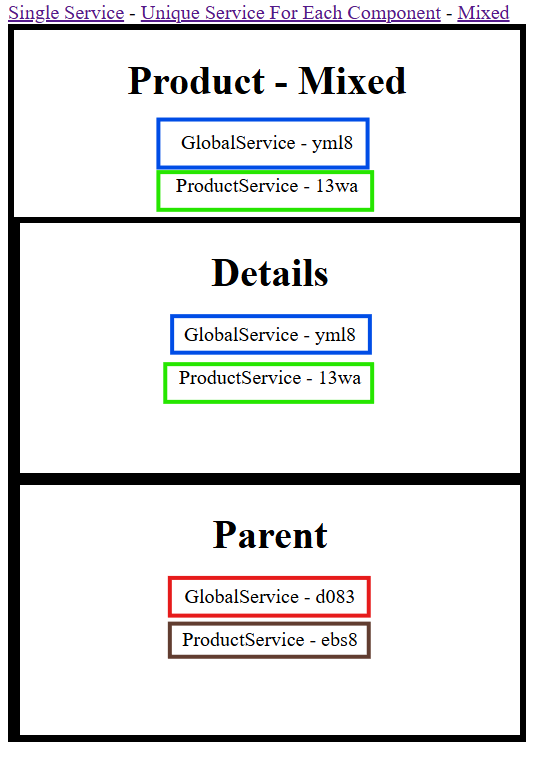
As you can see, the base and the details component shares our services, but the parent component received a new instance of both ProductService, but more importantly, GlobalService too.