
2025-09-06 @
Angular signal forms - Server side error handling
Changelog:
2025-09-09: Added link to part 3 about more advanced topics.
2025-12-08: This article has been upgraded to the released version of Angular 21.
2026-02-07: This article has been upgraded to Angular version 21.2.0-next.2, in which the Field directive has been renamed to FormField and the error object returned by the submit method should contain a fieldTree property instead of field.
In our second, much shorter look at Angular signal forms, we’ll take a look at the new submit function and how it enables us to apply server side validation errors to the affected inputs in a pretty neat way.
The repo that belongs to this article is the same that we used for the last post and it can be found here, with submit-form.ts added to demonstrate this feature.
The new submit function
So this new submit function accepts a FieldTree and an action. The FieldTree will be our entire form and action will be a mock HTTP request. With this, we will demonstrate how you could validate the entire form on the server side after submitting, but the errors returned by our action will be applied automatically to the correct sub-field.
Let’s take a look at our code and it will make more sense:
@Component({
  selector: 'app-submit-form',
  imports: [MatFormFieldModule, MatInputModule, MatButtonModule, Field],
  template: `
    <form>
      <mat-form-field>
        <mat-label>Name</mat-label>
        <input matInput [formField]="f.name" />
        @if (f.name().invalid()) {
          <mat-error>{{ f.name().errors()[0].kind }}: {{ f.name().errors()[0].message }}</mat-error>
        }
      </mat-form-field>

      <button mat-button type="button" [disabled]="f().invalid()" (click)="submitForm()">Submit</button>
    </form>
  `,
})
export default class ValidatedForm {
  f = form(signal({
    name: '',
  }), p => {
    required(p.name, { message: 'Name is required' });
  });

  submitForm() {
    submit(this.f, (f) => this.mockHttpRequest(f));
  }

  mockHttpRequest(form: FieldTree<{ name: string }>) {
    return Promise.resolve(
      form().value().name === 'Bálint'
        ? undefined
        : [{
          fieldTree: form.name,
          kind: 'server',
          message: 'Name is not valid'
        }]
    );
  }
}
We added a (click) listener to our button, which will invoke our submitForm function when it fires.
Then, we create our mockHttpRequest, which accepts our FieldTree as a parameter and it will simply return a Promise, which is enough for demonstration purposes. It’s important to note that our function accepts the FieldTree itself, not the value inside. If our validation criteria passes, we return undefined. If it doesn’t, then we have to return our error in a specific format.
We are returning an array of errors. The kind and message are pretty straightforward and we looked at those in the first post about the new signal forms.
The fieldTree property is new though. We pass the specific sub-field we want this error to be applied to. Again, we pass the field and subfield without invoking anything, so make sure it is form.name and not form.name() or anything like that. This will be used by submit in the background to identify which sub-field the error has to be applied to.
Now all we have left to do is to call submit in our submitForm method and pass the form and our action. Assuming we’ve done everything right, after we click our button, if the validation criteria in mockHttpRequest does not pass, our validation kind and message will show up right under our input, inside mat-form-field, which only shows up if specifically the name input is invalid, proving that this works as we intended.
Documentation issue
Disregard this, it has been fixed in recent versions.
One thing I should point out, is that at the time of writing this article, the documentation is not consistent with the actual functionality.
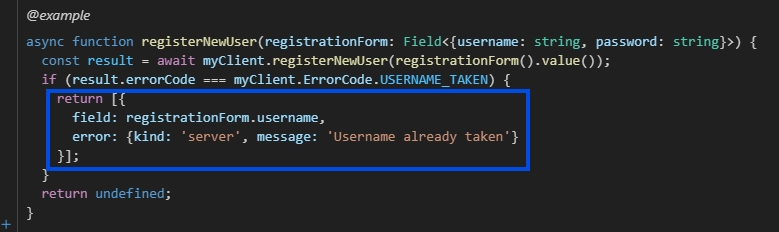
Issues are expected, as signal forms are very much experimental still, but make sure to pay attention, because the example from the documentation above tells us to return the error in a different format that will not work, as the actual definition of the ValidationError interface is this:
/**
 * Common interface for all validation errors.
 *
 * Use the creation functions to create an instance (e.g. `requiredError`, `minError`, etc.).
 */
interface ValidationError {
  /** Identifies the kind of error. */
  readonly kind: string;
  /** The field associated with this error. */
  readonly field: Field<unknown>;
  /** Human readable error message. */
  readonly message?: string;
}
I’m sure these little errors will be fixed fairly quickly, but even with these being around, the new Angular signal forms are a huge step in the right direction. I honestly can’t wait to actually start using these features in production.
The next issue about more advanced usages of Angular signal forms is out!